
Google Search Console Delayed by 60+ Hours: What You Need To Know and What To Do Now
If you logged into Google Search Console this week and noticed that your performance data stopped updating, you are not alone. Many website owners, SEO teams, and publishers are experiencing delays of 50 to 60 hours in the Search Performance report.
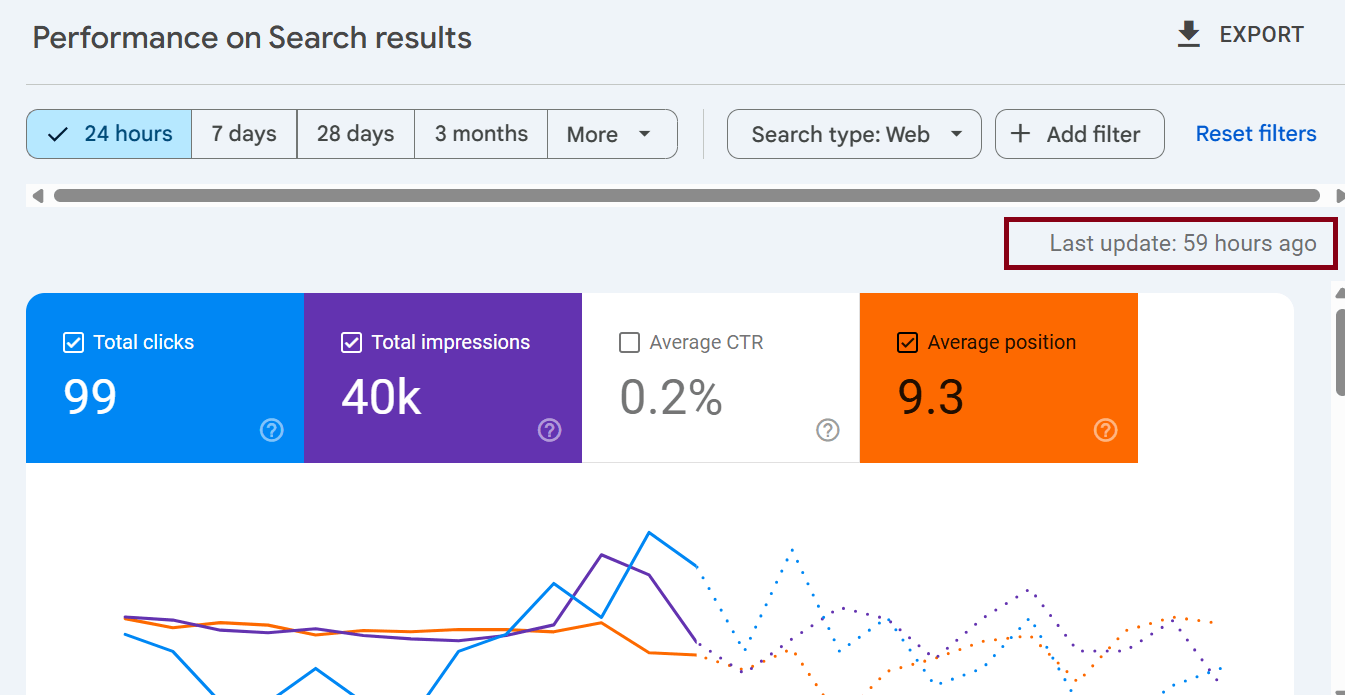
For people running time-sensitive product launches, trending topics, news content, or seasonal campaigns, this delay feels frustrating. Data drives decisions, and when that data freezes, everything pauses.
But before panic sets in, here’s the truth: this delay affects reporting, not ranking. Your site is still being crawled, visited, and ranked — you just cannot see the fresh numbers yet.
Let’s break down what’s happening, why it matters, and what you should do next.
What’s Actually Happening in Google Search Console?
Usually, Google Search Console shows performance data with a normal delay of about 24 to 48 hours. The system gathers search queries, impressions, clicks, CTR, and ranking movement, then processes and displays it.
Right now, the delay is longer… in some cases more than 60 hours. That means:
Clicks and impressions are still happening
Google continues crawling and indexing
Your content continues appearing in search
Only the reporting dashboard is frozen.
So the issue is not with your website. The issue is with how GSC pushes processed search data into the dashboard.
Why Is This Delay Happening?
Delays like this can happen for a few reasons. While Google rarely gives detailed technical explanations, these are common causes:
1. System Processing Backlog
When there is a spike in processed data or a system maintenance cycle, the reporting queue can slow down.
2. Infrastructure or Logging Updates
When Google upgrades features — like the newer 24-hour performance view or deeper filtering — it sometimes triggers temporary data lag.
3. Search Indexing Activity
Large algorithm adjustments or indexing shifts can temporarily slow reporting systems as Google rebalances and reprocesses large datasets.
Even if these delays feel inconvenient, they are temporary and usually resolve with all missing data restored.
Will This Google Performance Delay Affect Your SEO Rankings?
No. Rankings are not impacted by this performance reporting issue.
Search Console is a mirror and not the engine.
Even if the mirror is dusty, the engine keeps running.
Your:
Crawl rate
Indexing
Search appearance
Ranking signals
…remain active.
Once the search console delay ends, missing data fills in and metrics display normally.
Who Is Most Impacted by This Google Search Console Delay?
Every site owner feels the slowdown differently. Some barely notice it. Others feel it immediately.
This delay matters most if you work with:
Trending news content
Events or live campaign optimization
Product launches or limited-time sales
Large-volume SEO reporting schedules
Algorithm-sensitive monitoring (like migrations or redesigns)
If your website depends on fresh demand signals, the delay may temporarily block insights you rely on.
How to Handle the Search Console Delay Without Losing Control
Right now, patience helps, but so does strategy. Here’s what to do during the reporting freeze.
1. Avoid Making Ranking Assumptions
A sudden drop in impressions or clicks during this period may not be real. It may only reflect missing data.
Treat the numbers as incomplete until updates resume.
2. Check the 24-Hour View or Real-Time Preview
Some users find that the newer “24-hour” view shows fresher data than the main performance dashboard.
If your report offers that option, check it as a secondary reference.
3. Use Backup Analytics Sources
While Search Console covers search performance, other tools help fill gaps in visibility, such as:
Google Analytics real-time activity
Server logs
Your SERP tracking tools like Ahrefs, SEMrush and Bing webmaster tool
On-page engagement metrics
Merchant Center/Shopping data (if applicable)
They will not replace GSC, but they help you track momentum.
4. Pause Scheduled Reporting Sent to Clients or Teams
If you run weekly reports, dashboards, SEO reports, or campaign KPIs, delay them until the system updates.
This avoids confusion, misinterpretation, and unnecessary concern.
5. Communicate With Stakeholders
When clients or senior teams see stalled performance charts, they often assume something is broken.
A short explanation creates clarity, removes pressure, and preserves trust.
If you want, I can write a short notification template after this article.
What To Expect Once the Delay Ends
Once Google updates Search Console:
Missing data will appear
Metrics normalize
Trends become visible again
Your reporting flows normally
It is rare for GSC to permanently lose history. Nearly all missing entries get restored.
So the delay is an inconvenience, not a permanent loss.
How to Use Google Analytics When Search Console Data Is Delayed
When Search Console data pauses or becomes outdated, Google Analytics becomes one of the most reliable tools to understand how your website is performing in real time. While Analytics does not show detailed keyword-level search insights the way GSC does, it still offers strong visibility into user behavior and traffic flow.
Start by monitoring the Real-Time Overview. This confirms whether users are actively landing on your website through search, social, direct, or referral sources. If traffic remains stable or increases while GSC is delayed, this suggests your SEO presence continues to perform normally.
Next, check the Acquisition > Traffic Acquisition report. This report shows whether organic traffic is rising or slowing. Even though Analytics does not reveal which exact keywords are driving traffic, it confirms whether search visibility is moving in a positive or concerning direction.
Another useful area is the Landing Pages report. This report reveals which pages are receiving organic traffic and how visitors behave once they arrive. If newly published content starts receiving visits, it means your content has already appeared in search results even if GSC has not displayed the performance metrics yet.
Finally, review Engagement metrics such as scroll depth, session duration, and return visits. These signals help you understand whether the traffic coming from search engines is interested, engaged, and converting.
So even without Search Console data, Google Analytics allows you to make informed decisions, verify activity, and measure momentum without guessing or waiting in the dark.
How to Use Bing Webmaster Tools as an Alternative to GSC
While most site owners rely primarily on Google Search Console, Bing Webmaster Tools can become a valuable companion when GSC data is delayed. Even if Bing does not drive the same traffic volume as Google, it offers an impressive set of search insights that can fill gaps temporarily.
Begin by reviewing the Search Performance report. Here you will find impressions, clicks, CTR, and query data. Some SEOs are surprised to learn that Bing surfaces certain keyword variations and intent-based queries that Google does not display. This makes it useful not just as a backup solution but also as a complementary research source.
Use the URL Inspection feature to confirm whether new content is crawled and indexed. If Bing can detect new pages quickly, there is a strong chance Google is doing the same behind the scenes even if Search Console has not updated yet.
Another helpful feature is the Index Coverage and Crawl Control tool. If you recently migrated pages, updated your internal linking, or pushed structural SEO improvements, Bing’s crawlers can show early signs of progress.
The SEO Insights and Backlink reports inside Bing Webmaster Tools also help verify the strength of your visibility. When GSC appears stuck, seeing movement in new backlinks or growing impressions in Bing confirms that your site’s search presence remains active and healthy.
Using both tools side-by-side gives you redundancy, confidence, and deeper understanding instead of relying on a single platform.
How Long Will This GSC Delay Last?
Most Google Search Console reporting delays resolve naturally after a short period, usually within a few days. In many cases, the system processes missing data and restores everything once the backlog clears.
Search Console delays occur for a variety of reasons—system updates, data infrastructure changes, performance upgrades, or increased global query volume. While it feels inconvenient, delays like this are fairly normal and temporary.
During these periods, it is important not to draw conclusions from incomplete data. Sudden drops or plateaus in impressions, clicks, or rankings may simply reflect missing reports rather than actual performance decline.
Once the system catches up, Search Console typically fills in all missing data and normal reporting resumes. For most users, there is nothing required on the website side. No settings need to be changed. No indexing request is needed. No fixes are required.
Patience and perspective are key here. Search Console delays may slow reporting, but they do not erase progress, impact rankings, or prevent search visibility.
How This Delay Changes the Way You Approach SEO
While temporary, events like this teach valuable lessons.
⭐ Lesson 1: Never Depend on a Single Data Source
Search performance should be verified across multiple measurement points. If one slows, others continue.
⭐ Lesson 2: Add Time Buffers to Reporting Cycles
If a report is due Friday, make your cutoff Wednesday—not Thursday. Data lag is common, especially around algorithm updates.
⭐ Lesson 3: Track Trends, Not Just Numbers
SEO is long-term. A delayed report does not erase your progress or slow your growth.
What This Means for the Future of SEO Reporting
This delay also reveals something bigger: SEO reporting is shifting.
Google continues pushing toward:
Faster data refresh cycles
Deeper insight reports
Better segmentation and filtering
More real-time signals
Temporary delays often appear when platforms evolve. And evolution is a good sign.
This shift suggests that in the future, Search Console may offer:
Faster refreshes
More live-tracking options
Better keyword classification
So yes — delays are annoying. But they often indicate improvement happening behind the scenes.
Summary: Key Takeaways
Search Console data delays do not affect your SEO performance.
Only reporting is slow.
Here’s what to remember:
✔ Your content is still indexed and ranked
✔ The delay is temporary
✔ Your data will update and fill back in
✔ Avoid making decisions based on delayed metrics
✔ Use alternative analytics while waiting
✔ Communicate clearly with your team or clients
Your SEO momentum has not stopped — only your visibility into it paused.
Final Thought
Search Console is one of the most valuable tools in the SEO ecosystem, but like any system, it occasionally slows down. Delays can be frustrating, especially when you rely on fresh metrics, but they do not represent lost ranking or lost progress.
Your site continues performing. Your users continue searching. Your content continues gaining visibility.
Sometimes digital growth requires patience — and this is one of those moments.